The free trial quietly ends, and one cold morning the app that used to warm up your car asks for a yearly payment first. The remote start still lives in the car, the hardware has not changed, and yet the button now costs money. That is the moment a lot of Hyundai owners start looking for another way.
Hunting for Hyundai Blue Link alternatives once the subscription lapses usually comes down to one question: which feature do you actually miss? For most people it is remote start, and there are cheaper or free ways to get it back. Others want location tracking or door control. This guide runs through the real options owners use, from the key fob already in your pocket to aftermarket kits that charge nothing each year, so you can replace only what you need.
The Quick Rundown
The cheapest fix is often free: many Hyundai key fobs have a built-in remote start that works without any subscription, just at shorter range. For phone control with no yearly fee, an aftermarket remote start like Compustar is a one-time install. OBD modules such as the Omega Linkr add app-based start and tracking for a low annual cost, and basic trackers like Bouncie cover location. Community apps exist but still need an active Blue Link plan to work.
Why Owners Look Past Blue Link
Blue Link, now marketed as Bluelink, comes with a complimentary trial on new Hyundais, and once that runs out the remote features move behind a paid subscription with tiered plans. The car still has the antenna and the hardware, but app-based remote start, remote lock, and connected services pause until you pay.
None of that is unusual anymore, and it is not unique to Hyundai. Still, paying a recurring fee for a button that is physically built into a car you already own rubs people the wrong way, which is why the alternatives below get so much attention on owner forums.
| Alternative | Cost model | What you get |
|---|---|---|
| Key fob remote start | Free, already owned | Short-range engine start |
| Aftermarket kit (Compustar) | One-time install | Start, lock, unlock via fob or app |
| OBD LTE module (Omega Linkr) | Low annual fee | App start, doors, tracking |
| OBD tracker (Bouncie) | Low or no monthly fee | Location and health only |
| Remote-only Blue Link tier | Reduced subscription | Native app remote start |
| Community app | Free, needs active plan | Better front end, no fee bypass |
1. The Remote Start Already on Your Key Fob
Before buying anything, check your key fob. Many Hyundai models include a physical remote start built into the fob itself, and it keeps working after Blue Link expires because it does not use the cellular connection at all.
The trade-off is range. Fob remote start works from a much shorter distance than an app, typically within sight of the car rather than from inside your house. For a driveway or a parking lot, though, it is free and instant, and plenty of owners with lapsed subscriptions rely on nothing else.
2. An Aftermarket Remote Start System
For phone control without a yearly fee, an aftermarket remote start is the classic answer. Systems from brands like Compustar and Firstech install into the car and can integrate with your factory key fob, letting you start the engine and lock or unlock the doors.
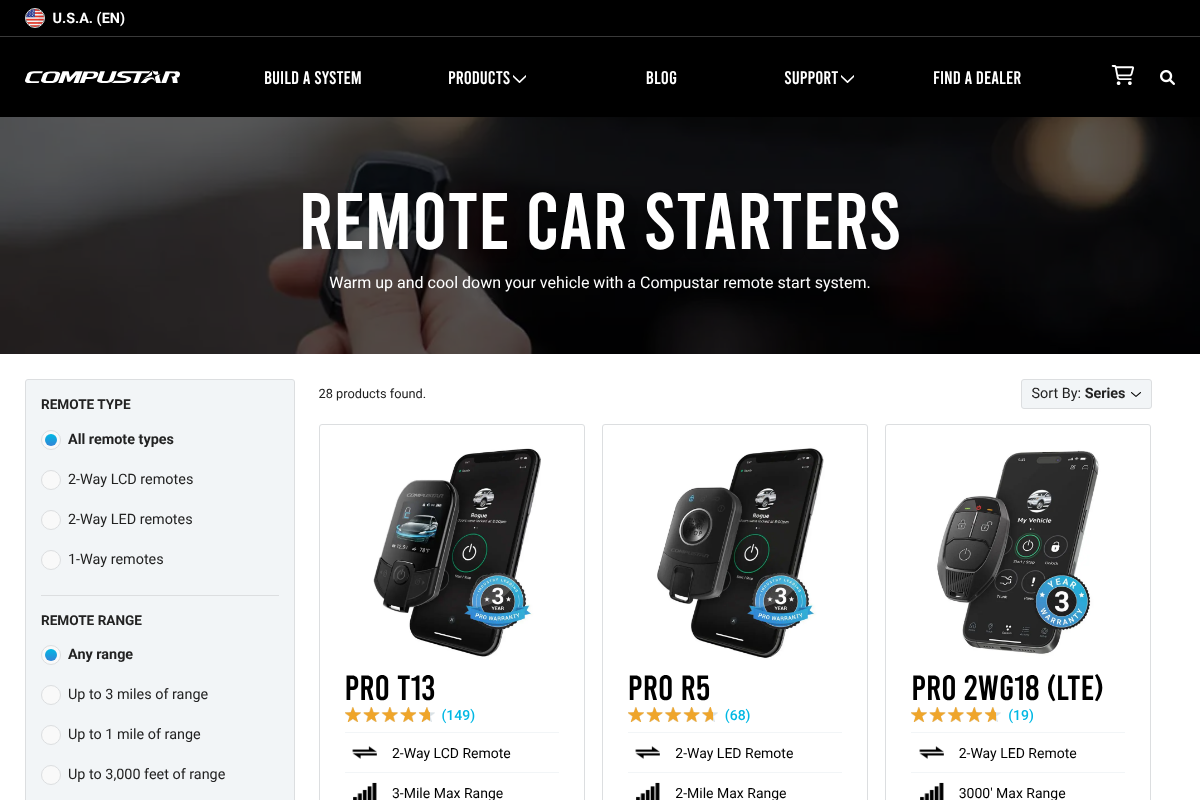
The appeal is the payment model: a one-time cost for the hardware and installation, with no mandatory subscription for the basic remote start, as Compustar’s remote-start lineup shows. Some add an optional phone-control module for a small annual fee, but the core function is yours to keep once it is installed by a qualified shop.
3. An OBD-Port LTE Module
If you want the full app experience, remote start plus lock, unlock, and vehicle location, an OBD module is the closest match to Blue Link. A device such as the Omega Linkr plugs into the diagnostic port and adds a cellular link of its own, controlled from a phone app.
These usually bundle a year of service, then charge a modest annual fee that runs well below a typical connected-car plan. Because the module brings its own data connection, it works independently of Blue Link, and you are paying a smaller company rather than the automaker.
4. A Basic OBD Tracker
Some owners do not miss remote start at all and only want to know where the car is and how it is running. For that, a plug-in tracker like Bouncie or Vyncs covers location, trip history, and basic health alerts.
These are cheaper and simpler than a full remote-start setup, with either a low monthly fee or a no-monthly-fee model depending on the brand. They will not start your engine, so pick this route only if tracking and diagnostics are the features you actually care about.
5. The Remote-Only Blue Link Tier
If it is genuinely just remote start you want, you may not need to leave Blue Link entirely. Hyundai’s plans are tiered, and owners have reported being able to keep a remote package without paying for the pricier navigation and connected-services bundle.
It is worth calling and asking exactly what the lowest remote tier costs, because the headline price often reflects the full package. Downgrading to the feature you use can land cheaper than the default renewal offer, and it keeps the native app working.
6. Community and Open-Source Apps
Owners frustrated with the official app have built their own, and open-source replacements for the Hyundai app circulate on enthusiast forums. They can be faster and cleaner than the factory software for day-to-day use.
Here is the honest catch: these apps talk to Hyundai’s own servers, so they still require an active Blue Link subscription to function. They improve the experience, but they are not a way around the fee itself, so treat them as a nicer front end rather than a true alternative.
How to Choose What Replaces It
Start by naming the one feature you miss. If it is remote start on a cold morning, the fob or an aftermarket kit solves it cheaply. If you want to warm the car from your desk at work, an OBD LTE module gives you that app reach without the automaker’s pricing.
Then weigh upfront cost against recurring cost. An aftermarket install costs more on day one but nothing after, while a subscription or module fee is smaller but forever. For many lapsed owners, a one-time aftermarket setup pays for itself within a couple of years compared to renewing.
Frequently Asked Questions
What are the best Hyundai Blue Link alternatives after the subscription ends?
The simplest is your key fob’s built-in remote start, which needs no subscription. For phone control, an aftermarket system like Compustar is a one-time cost, an OBD module like the Omega Linkr adds app start and tracking for a low annual fee, and a plug-in tracker covers location only.
Can I use Hyundai remote start without Blue Link?
Yes. Many Hyundai key fobs have a physical remote start that works without any subscription, though only within a short range of the car. For longer-range, phone-based starting, you need either a paid Blue Link plan or an aftermarket system installed in the vehicle.
Aftermarket remote start vs an OBD module: which is better?
An aftermarket remote start is a one-time install with no yearly fee and strong reliability, best if you mainly want to start the car. An OBD module like the Omega Linkr is easier to self-install and adds tracking and door control through an app, for a small annual cost.
Do the free Bluelink replacement apps avoid the subscription?
No. Open-source and community apps still connect through Hyundai’s servers, so they require an active Blue Link subscription to work. They can be faster than the official app, but they do not remove the fee. Only aftermarket hardware truly bypasses the subscription.
Is it worth keeping a Blue Link subscription?
It depends on the features you use. If you rely on remote start, stolen-vehicle help, and automatic crash notification, the plan can be worth it. If you only want occasional remote start, the key fob or a one-time aftermarket kit is usually cheaper over a few years.
The Bottom Line
A lapsed Blue Link subscription is annoying, but it rarely leaves you stuck. Check the fob first, since the feature you are missing might already be in your hand for free. If you want phone control, decide whether a one-time aftermarket kit or a low-cost OBD module fits how you drive, and skip the community apps if your goal is to stop paying. For more on the tech built into modern cars, browse YouGottaRead’s Autos section, including our look at the screens and buttons taking over dashboards.