You quote a client a flat rate, they agree, and then the contract needs a verified signature because real money is changing hands. Fine. Except the tool you use charges you again every single time a signer has to prove who they are, and that line item was nowhere in your budget. For a freelancer sending a handful of agreements a month, those little per-verification and per-signer charges add up faster than the base subscription ever did.
If you are hunting for DocuSign alternatives with ID verification that do not tack on a fee for every signer, the good news is that predictable, freelancer-friendly options exist. The trick is knowing which tools bundle identity checks into a flat plan, which charge a transparent per-check rate, and which quietly meter you the way DocuSign does. Here are seven alternatives worth a look, with honest notes on where each one still costs extra.
The Short Answer
For predictable pricing, look at SignWell, BoldSign, and Zoho Sign, which offer flat plans with unlimited documents and light identity checks like SMS or access codes included. For stronger government-ID verification, Dropbox Sign and SignNow are cleaner than DocuSign on per-seat cost. Documenso, which is open source and self-hosted, removes per-signer fees entirely. Just know that heavy KBA or government-ID checks carry a real cost almost everywhere, since they rely on a paid third-party lookup.
Why ID Verification Costs Extra
Before comparing tools, it helps to understand where the money goes, because it changes what a fair price looks like. A plain e-signature, where someone clicks to sign and you get an audit trail, is cheap for a vendor to provide. Real identity verification is different. Knowledge-based authentication (KBA) quizzes the signer on facts drawn from public records, and government-ID checks scan a photo ID and often add a selfie liveness check. Both call out to a paid third-party service on every attempt, so that cost gets passed to you.
That is why DocuSign charges an add-on for its ID Verification. By third-party estimates it runs roughly $2 to $5 per verification attempt, and DocuSign does not list the rate on its main pricing page, so you should confirm it directly. The frustration for freelancers is not that verification costs something; it is that DocuSign layers per-envelope limits, per-seat pricing, and per-verification fees on top of each other, so a simple verified contract turns into three separate meters running at once. The alternatives below win by flattening at least one of those meters.
How We Picked These Alternatives
This roundup focuses on what a solo freelancer or a tiny studio actually needs: a verified signature on a contract without a surprise invoice. We prioritized tools with transparent, predictable pricing over quote-only enterprise plans, and we favored plans that include unlimited documents or generous monthly limits so a busy month does not trigger overage charges. We looked for identity options ranging from light SMS or access-code checks up to KBA and government-ID verification, and we noted honestly where the stronger checks still cost extra. Finally, we weighed how easy each tool is for a non-technical user to set up, and included one self-hosted option for those who want to remove per-signer fees completely.
The 7 Best DocuSign Alternatives for Verified Signing
1. SignWell: Best flat pricing for freelancers
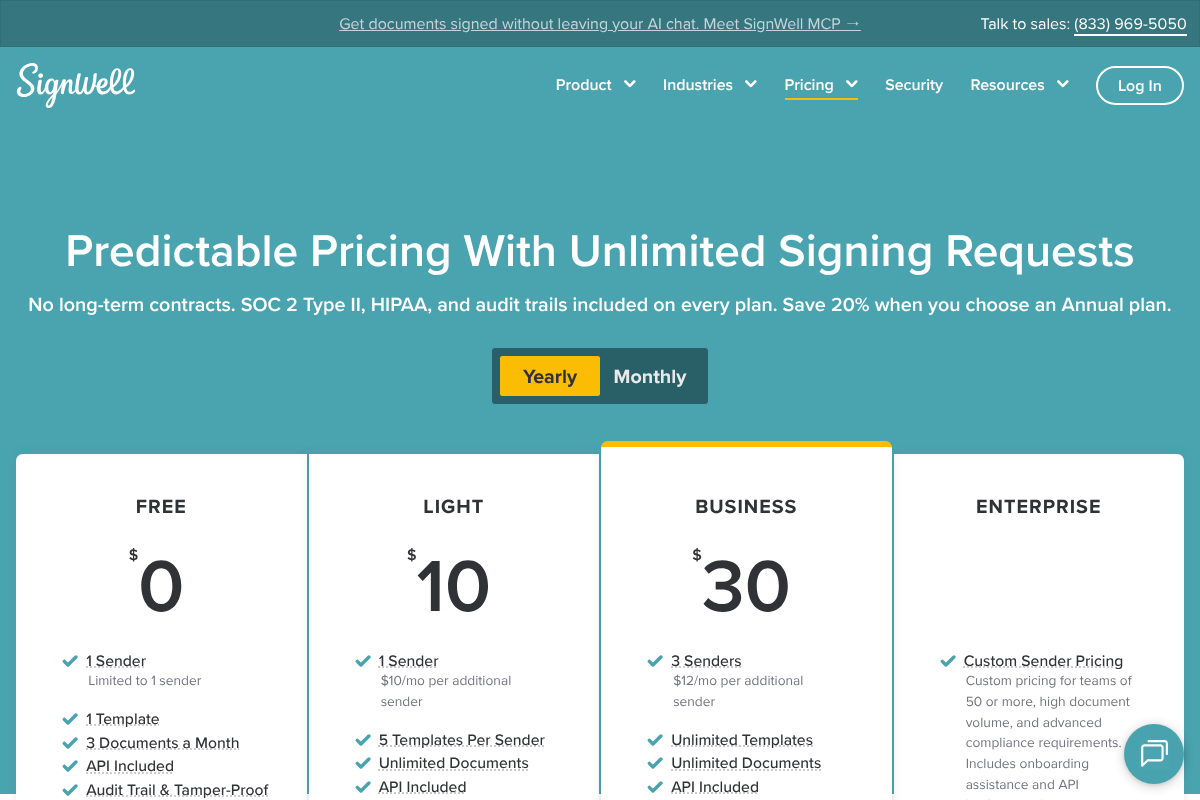
Who it is for: solo freelancers who want unlimited documents on a low, fixed monthly bill. SignWell’s paid plans include unlimited signing requests, so a heavy contract month does not cost more, and its pricing page shows a free tier plus a low-cost Light plan and a Business plan, with extra senders charged at a clear flat rate. For identity, it leans on access codes and SMS verification, which are plenty for most freelance agreements.
The honest catch: SignWell is built around simple, affordable e-signing rather than heavy compliance-grade identity proofing, so if a client demands full government-ID or KBA verification, this is not the tool for that specific job.
2. Dropbox Sign: Best for reusable government-ID verification
Who it is for: freelancers who genuinely need document-grade ID checks. Dropbox Sign, formerly HelloSign, offers a Verified Identity feature that combines a government-ID scan with a liveness check, and once a signer verifies, they can reuse that digital identity on future agreements. Its paid plans include unlimited signature requests, so your own sending is predictable. You can see the current plans on the Dropbox Sign site.
The honest catch: the strong government-ID verification sits on higher tiers or as an add-on, so it is not free. The win over DocuSign is that your team seats and monthly volume are predictable, not that identity proofing is suddenly free.
3. SignNow: Best for unlimited team seats
Who it is for: a small studio that adds occasional collaborators and hates per-seat math. SignNow includes unlimited users on its paid plans, so growing your team does not multiply your bill the way DocuSign’s per-seat pricing does, and it offers phone-call and knowledge-based authentication for higher-assurance signing. You can compare tiers on the SignNow site.
The honest catch: the advanced authentication methods can carry a per-use cost, and the interface is more utilitarian than some rivals. It rewards a little setup time with strong value.
4. Zoho Sign: Best for solo users already in Zoho
Who it is for: freelancers who live in Zoho’s ecosystem or want a rock-bottom monthly price. Zoho Sign’s Standard plan is inexpensive and adds SMS signer authentication, and it fits neatly with Zoho’s invoicing and CRM tools. Details are on the Zoho Sign site.
The honest catch: the free tier is tight, limited to a single user and a handful of envelopes a month, and the more advanced identity methods live on higher plans. For a light-volume solo, though, the value is hard to beat.
5. BoldSign: Best developer-friendly free tier
Who it is for: technically comfortable freelancers and small teams who want a generous free plan and clean API. BoldSign’s free tier includes a real monthly allowance of signature requests, its paid Growth plan starts low per user, and it supports SMS and knowledge-based authentication. Pricing is laid out plainly on the BoldSign pricing page.
The honest catch: it is a newer, smaller name than DocuSign, and the strongest identity options appear on higher plans. If brand familiarity matters to your clients, weigh that in.
6. PandaDoc: Best when the document is the deal
Who it is for: freelancers who send proposals and contracts as one packaged document. PandaDoc combines document creation with signing and offers a free e-sign tier for basic needs, with SMS and email verification available. It shines when the signature is the last step of a polished proposal rather than a standalone form.
The honest catch: KBA and stronger identity checks sit on business tiers, and the full platform is more than a freelancer who only needs signatures may want to pay for. Match the plan to how much of the document workflow you actually use.
7. Documenso: Best for removing per-signer fees entirely
Who it is for: technical freelancers who want total control and zero per-signer charges. Documenso is open source, so if you self-host it, there is no vendor metering your signers at all, and you can wire in whatever identity provider you choose. You can explore it on the Documenso site.
The honest catch: you are the one running and securing it, and you handle any government-ID or KBA integration yourself, which means real cost and effort elsewhere. This is a great fit for the technically minded and a poor one for anyone who wants to just sign a PDF today.
Quick Comparison
| Tool | Best for | Identity options | Pricing model |
|---|---|---|---|
| SignWell | Flat freelancer pricing | SMS, access code | Free tier; flat plans, unlimited docs |
| Dropbox Sign | Reusable government-ID checks | Government ID + liveness, SMS | Unlimited requests on paid; IDV on higher tiers |
| SignNow | Unlimited team seats | KBA, phone call, SMS | Unlimited users on paid plans |
| Zoho Sign | Low-cost solo use | SMS, ID methods on higher tiers | Small free tier; cheap Standard plan |
| BoldSign | Developer-friendly free tier | KBA, SMS | Generous free tier; low per-user paid |
| PandaDoc | Proposal-plus-signature | SMS, email; KBA on business tiers | Free e-sign tier; paid document plans |
| Documenso | No per-signer fees | Bring your own provider | Free if self-hosted (open source) |
This is general information to help you compare tools, not legal advice, and e-signature and identity-verification requirements vary by industry, document type, and jurisdiction. Some agreements need a specific level of identity assurance to hold up, so confirm what your situation requires and verify current pricing and features directly with each provider, since plans and fees change over time. When a signature carries real legal or financial weight, check the tool meets the standard you need.
Frequently Asked Questions
What are the best DocuSign alternatives with ID verification and no per-signer fees?
SignWell, BoldSign, and Zoho Sign offer flat pricing with unlimited or generous document limits and light identity checks like SMS included, so you avoid per-signer surprises. For stronger government-ID verification, Dropbox Sign and SignNow are more predictable on seat cost than DocuSign, and Documenso removes per-signer fees entirely if you self-host it. Keep in mind that heavy KBA or government-ID checks usually carry a real cost anywhere, because they use a paid third-party service.
Why does DocuSign charge extra for identity verification?
Because real identity verification relies on an outside service. Knowledge-based authentication pulls questions from public records, and government-ID checks scan an ID and often add a liveness selfie, and each attempt calls a paid third party. DocuSign passes that cost along as a per-verification add-on, estimated by third parties at roughly $2 to $5 per attempt, though it is not listed on the main pricing page, so confirm directly. The bigger issue for freelancers is that this stacks on top of per-seat and per-envelope charges.
Can I verify a signer’s identity for free?
Light verification, yes; strong verification, rarely. SMS one-time codes, email verification, and access codes are inexpensive or included on many plans, including free tiers, and they are enough for a lot of everyday freelance contracts. Full knowledge-based authentication and government-ID scanning with a liveness check almost always cost extra, on any platform, because they use a paid identity service. Match the level of verification to what the specific agreement actually requires rather than paying for the strongest check by default.
Do I actually need KBA or government-ID verification for freelance contracts?
Often not. Many freelance agreements are fine with a standard e-signature plus a light check like an SMS code, which creates a solid audit trail. Stronger identity proofing tends to matter for regulated or high-value documents, such as certain financial, real-estate, or legal paperwork, where the required level of assurance is higher. Because requirements vary by industry and jurisdiction, confirm what your particular contract needs so you neither overpay for verification nor fall short of a legal standard.
Is a cheaper e-signature tool as legally valid as DocuSign?
In general, electronic signatures from reputable providers carry the same legal standing, since validity comes from the applicable e-signature laws and a proper audit trail, not from the brand name on the tool. What differs between tools is the level of identity assurance and the strength of the audit record. For most agreements, a well-run alternative with a clear audit trail is equivalent. For documents with strict requirements, confirm the tool provides the specific assurance level your situation calls for.
The Bottom Line
DocuSign’s identity-verification fees are not unreasonable in isolation; the problem is that they stack on top of per-seat and per-envelope pricing until a simple verified contract feels like a metered taxi ride. The fix is to pick a tool that flattens the meters you can control. Choose SignWell, BoldSign, or Zoho Sign for predictable flat pricing with light identity checks, step up to Dropbox Sign or SignNow when you need government-ID or KBA verification without per-seat pain, and consider self-hosting Documenso to erase per-signer fees for good. Just budget honestly for strong identity checks, which cost money everywhere. For more on keeping freelance tools affordable, see our guides to invoicing tools that handle purchase-order numbers and Stripe alternatives for freelancers facing payout holds, or browse the YouGottaRead Business section.