


Here is the small print nobody reads until the box is open: a lot of smart locks need a second gadget, a hub or bridge, plugged in near your router before the good features switch on. It is one more thing to buy, one more thing to power, one more thing to break. So if you have been hunting for smart lock alternatives without a hub, you are asking exactly the right question, because a whole category of locks now connects on its own and skips that extra box entirely.
The catch is that “no hub” gets used loosely in marketing, and a few locks quietly rely on a bundled bridge or a Thread border router you did not know you needed. Below are nine hub-free smart locks that are actually on sale in 2026, what each one is good for, and the honest caveats, including which features still want a hub even on a lock that ships without one.
The Short Version
A hub-free smart lock connects one of two ways: built-in Wi-Fi that talks straight to your router, or direct Bluetooth that talks to your phone at the door. Locks like the Schlage Encode Plus, Kwikset Halo, August Wi-Fi Smart Lock, Ultraloq U-Bolt Pro WiFi, and eufy S230 have Wi-Fi built in, so no separate bridge is required. The main honest caveat is that some remote, Apple Home, and Matter features can still lean on a home hub even when the lock itself does not.
How We Chose These Hub-Free Locks
This is a roundup with a strict entry rule, so the criteria matter more than usual:
- It connects on its own. Every pick uses built-in Wi-Fi or direct Bluetooth, so you do not buy a separate bridge just to use the lock. Locks that bundle a required Wi-Fi hub in the box were left out, because that is still a hub.
- You can buy it now. Only locks that are currently sold in 2026 made the list, not discontinued models that still float around in old reviews.
- It is real security hardware. These are proper deadbolts or retrofit mechanisms from established makers, not novelty locks.
- It covers a different need. The nine span keypad, fingerprint, retrofit, hidden, and Apple-first designs, so there is a fit for most doors.
- We are honest about the asterisks. Where a feature such as remote unlock, Apple Home, or Matter still wants a hub, the entry says so plainly instead of hiding it.
To check each one, we read the maker’s current product pages, confirmed the hub-free claim and that the lock is on sale today, and looked at how each handles remote access, since that is where a hidden hub requirement usually shows up.
What “Works Without a Hub” Actually Means
Before the list, it helps to know what you are really buying, because the word “hub” hides a couple of traps.
There are two genuinely hub-free paths. A built-in Wi-Fi lock joins your home network directly, so you get app control and remote access with nothing extra plugged in. A direct Bluetooth lock pairs with your phone at the door, which is rock solid up close but does not reach the internet by itself, so remote features may be limited or need another device.
Now the traps. A Matter badge does not automatically mean no hub. Matter locks that run over Thread need a Thread border router, which is usually a hub or a smart speaker, so those are not hub-free in practice. The truly hub-free Matter locks are the ones that carry Matter over Wi-Fi. Separately, Apple Home Key tap-to-unlock works locally at the door, but remote unlock and automations through Apple Home generally want an Apple home hub such as a HomePod or Apple TV. So in almost every case, “no hub” means “no separate bridge to use the lock,” while a few remote or automation extras may still ask for one.
Hub-Free Smart Locks at a Glance (2026)
| Lock | How it connects | Unlock methods | Best for |
|---|---|---|---|
| Schlage Encode Plus | Built-in Wi-Fi + Apple Home Key | Keypad, phone tap, app, key | Apple households wanting tap-to-unlock |
| Kwikset Halo | Built-in Wi-Fi | Keypad, app, key | A simple Wi-Fi keypad lock |
| Kwikset Halo Touch | Built-in Wi-Fi | Fingerprint, app, key | Fingerprint entry, no codes to share |
| August Wi-Fi Smart Lock | Built-in Wi-Fi | App, key (retrofit) | Renters keeping their existing keys |
| Ultraloq U-Bolt Pro WiFi | Built-in Wi-Fi | Fingerprint, keypad, app, key | Every unlock method in one lock |
| eufy S230 | Built-in Wi-Fi | Fingerprint, keypad, app, key | Fingerprint fans avoiding subscriptions |
| Yale Assure Lock 2 (Wi-Fi) | Built-in Wi-Fi module | Keypad or key-free, app, key | Picking your own connectivity module |
| Aqara Smart Lock U100 | Bluetooth + Apple Home Key | Fingerprint, keypad, phone tap, NFC, key | Apple homes fine without remote unlock |
| Level Lock+ | Bluetooth + Apple Home Key | Phone tap, app, key | A lock that hides that it is smart |
1. Schlage Encode Plus: Wi-Fi Keypad With Apple Home Key
The Schlage Encode Plus is a keypad deadbolt with Wi-Fi built in, so app control and remote access work without a Schlage bridge. It also carries Apple Home Key, letting you tap an iPhone or Apple Watch to unlock. Schlage’s build quality is a big part of the appeal, and the physical lock feels the part.
Who it is for: Apple households that want to tap to unlock and still keep a keypad as a backup for guests.
Honest cons: It sits at the premium end of the price range, and while the lock’s own Wi-Fi handles app control, the full Apple Home experience such as remote unlock and hands-free features generally wants an Apple home hub. It is keypad-based, with no fingerprint reader. You can see the current model on the Schlage Encode Plus page.
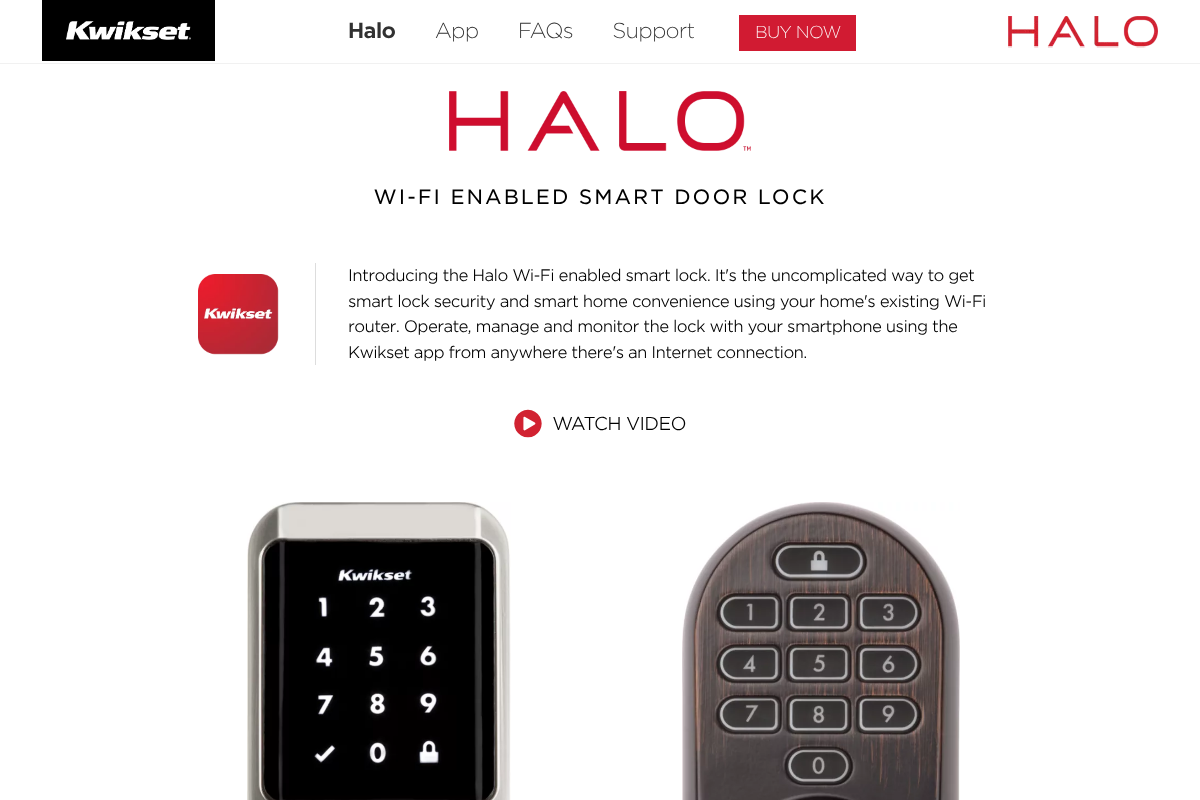
2. Kwikset Halo: The Straightforward Wi-Fi Keypad Lock
The Kwikset Halo is about as direct as hub-free gets. It uses your home’s existing Wi-Fi router, with no separate hub and no hub cost, and adds a touchscreen keypad with a feature that scrambles the displayed digits so smudges do not reveal your code. If you want smart-lock basics without learning an ecosystem, this is a clean choice.
Who it is for: People who want a no-fuss Wi-Fi keypad deadbolt and remote app access, without adopting a whole smart-home platform.
Honest cons: Wi-Fi radios use more power than Bluetooth-only locks, so plan on changing batteries more often. The base Halo is keypad-only, without a fingerprint reader. Details are on the Kwikset Halo page.

3. Kwikset Halo Touch: Fingerprint Entry, No Codes to Share
The Halo Touch is the fingerprint sibling of the Halo, with the same built-in Wi-Fi and no hub. Instead of a keypad, you unlock with a stored fingerprint, which sidesteps the whole business of sharing and rotating codes. It keeps a traditional key as a backup and app control over Wi-Fi.
Who it is for: Households that prefer fingerprint entry, so there is nothing for a guest or child to memorize or accidentally pass along.
Honest cons: Fingerprint readers can be temperamental with wet, dirty, or very cold fingers, and like other Wi-Fi locks it goes through batteries faster. There is no keypad on this model, so a fingerprint or the physical key are your at-the-door options. See the Kwikset Halo Touch page.
4. August Wi-Fi Smart Lock: Keep Your Keys, Add the Smarts
The August Wi-Fi Smart Lock is a retrofit. It mounts on the inside of your door over your existing deadbolt, so the outside hardware and your current keys stay exactly as they are. Wi-Fi is built into the lock, so no separate bridge is required for remote access, and installation is genuinely quick.
Who it is for: Renters and anyone who wants to keep their existing keyed cylinder while adding app control and auto-lock.
Honest cons: Because it only replaces the interior thumbturn, there is no keypad or fingerprint on the outside unless you add August’s separate keypad accessory. Auto-unlock that senses your approach can be hit or miss depending on your phone and door. The current model is on the August Wi-Fi Smart Lock page.
5. Ultraloq U-Bolt Pro WiFi: Every Unlock Method in One Lock
The Ultraloq U-Bolt Pro WiFi packs fingerprint, keypad, app, and key into a single deadbolt, with Wi-Fi built in so you skip the bridge. It is the pick for people who cannot decide which unlock method they want, because it includes essentially all of them and lets different household members use whichever suits them.
Who it is for: Households that want maximum flexibility, with fingerprint for adults, a code for a babysitter, and a key as the fallback.
Honest cons: The maker rates shorter battery life on the Wi-Fi version, often a few months on standard batteries, since the radio is doing more work. With so many features, the app and setup can feel busier than a single-method lock. See the Ultraloq U-Bolt Pro WiFi page.
6. eufy S230: Fingerprint Without the Monthly Fee
The eufy S230, sometimes sold as a FamiLock model, is a Wi-Fi fingerprint deadbolt that leans toward local storage and does not push a mandatory subscription for the core lock features. Fingerprint reads are fast, and you get keypad and key backups alongside app access over the built-in Wi-Fi.
Who it is for: Fingerprint fans who dislike monthly fees and prefer a lock that keeps more of its data local rather than in the cloud.
Honest cons: You are inside eufy’s own app and account, and its wider smart-home integrations are narrower than some of the big keypad brands, so check that it plays nicely with whatever else you run. The current lock is on the eufy S230 page.
7. Yale Assure Lock 2 (Wi-Fi Model): Pick Your Own Connectivity
The Yale Assure Lock 2 takes a modular approach. The lock body stays the same, and you choose a smart module: Bluetooth-only, Wi-Fi, or Matter. The Wi-Fi version gives you built-in Wi-Fi with no separate hub, and Yale offers both keypad and key-free versions of the deadbolt, so you can match the look you want.
Who it is for: People who like the idea of choosing their connectivity up front, or going fully key-free, rather than being locked into one radio.
Honest cons: The hub-free capability comes from buying the specific Wi-Fi version, so you have to get the right module, and switching modules later is an added cost rather than a free software change. Confirm you are buying the Wi-Fi configuration, not the Bluetooth-only one, if remote access matters to you.
8. Aqara Smart Lock U100: Great at the Door, Honest About Remote
The Aqara Smart Lock U100 is the caveat pick, and it earns its place by being upfront. At the door it does a lot without any hub: fingerprint, keypad, NFC, a physical key, and Apple Home Key tap-to-unlock with an iPhone or Apple Watch all work locally. For many people, that local package is all they use.
Who it is for: Apple households that want tap-to-unlock and fingerprint at the door and are comfortable skipping remote unlock, or already own a home hub.
Honest cons: This is where “no hub” has an asterisk. Local unlocking is hub-free, but remote unlock, automations, and Matter support require an Apple home hub or an Aqara hub. So it is genuinely hub-free only if you stick to at-the-door use. The maker spells this out on the Aqara Smart Lock U100 page.
9. Level Lock+: The Lock That Hides That It Is Smart
The Level Lock+ takes the opposite design tack from a chunky keypad. Its motor lives inside the deadbolt itself, so from the outside it looks like an ordinary lock, with the smarts hidden in the hardware. It works over direct Bluetooth at the door and supports Apple Home Key, so you can tap to unlock without a keypad on display.
Who it is for: People who want a smart lock nobody can tell is smart, which suits design-conscious homes and rentals where a big keypad feels out of place.
Honest cons: Because it is Bluetooth-direct, remote access and automations rely on an Apple home hub rather than the lock reaching the internet on its own. The minimalist, invisible design also tends to command a premium over more conventional-looking locks. Confirm the current configuration before you buy, since remote features depend on that home hub.
Frequently Asked Questions
What are the best smart lock alternatives without a hub?
The strongest hub-free options in 2026 are locks with built-in Wi-Fi, since they connect to your router directly with no bridge. That includes the Schlage Encode Plus, Kwikset Halo and Halo Touch, August Wi-Fi Smart Lock, Ultraloq U-Bolt Pro WiFi, eufy S230, and the Wi-Fi version of the Yale Assure Lock 2. Bluetooth-direct locks like the Aqara U100 and Level Lock+ also work hub-free at the door, though their remote features may want a home hub. Pick based on which unlock methods you want.
Do any smart locks really work with no hub or bridge at all?
Yes. Locks with built-in Wi-Fi need only your existing router, your phone, and the lock, with nothing extra plugged in. That covers app control, remote lock and unlock, and notifications for models like the Kwikset Halo or Ultraloq U-Bolt Pro WiFi. The nuance is that some smart-home extras, such as Apple Home automations or Matter over Thread, can still ask for a hub. For the core job of locking and unlocking remotely, a built-in Wi-Fi lock does it on its own.
Does a Matter smart lock need a hub?
It depends on how the lock uses Matter. A Matter lock that runs over Thread needs a Thread border router, which is typically a hub or a smart speaker, so it is not hub-free in practice. A Matter lock that runs over Wi-Fi can work without a separate bridge. So a Matter badge alone does not guarantee no hub. If avoiding a hub is the goal, look specifically for built-in Wi-Fi and check whether the Matter features route through Thread.
Are Wi-Fi smart locks or Bluetooth smart locks better without a hub?
Built-in Wi-Fi is better if you want remote access without any extra device, because the lock reaches the internet on its own. Direct Bluetooth is extremely reliable at the door and easier on batteries, but it does not reach the internet by itself, so remote features are limited or depend on another device. If you mainly control the lock while standing at your door, Bluetooth is fine. If you want to check or open it from anywhere, choose a built-in Wi-Fi model.
Will a hub-free smart lock use more battery?
Generally yes, a built-in Wi-Fi lock draws more power than a Bluetooth-only one, because keeping a Wi-Fi connection alive is more demanding. Expect to change or recharge batteries more often on Wi-Fi models, and some makers rate only a few months per set on the busiest locks. Bluetooth-direct locks tend to last longer between changes. Most locks warn you well before the batteries die, and all of these keep a physical key or backup power option so you are never locked out.
The Bottom Line
You do not have to accept a second box on your shelf to get a smart lock. If you want the simplest path, a built-in Wi-Fi deadbolt like the Kwikset Halo, August Wi-Fi Smart Lock, Ultraloq U-Bolt Pro WiFi, or eufy S230 gives you app control and remote access with nothing extra plugged in. If you live in an Apple household, the Schlage Encode Plus, Aqara U100, and Level Lock+ add tap-to-unlock, just remember that a few remote and automation features can still want a home hub. Match the unlock methods to how your household actually comes and goes, and you will find a hub-free lock that fits. For more on living with these locks, see our guides to choosing a hub-free smart lock and why auto-unlock drains smart lock batteries, or browse the YouGottaRead Home & Garden section.


